
Key Points
- AI Overviews now generate natural‑language answers for Gmail search queries.
- Overviews pull information directly from emails and cite the source.
- Pro and Ultra subscribers gain an AI proofreading assistant with dotted‑underline suggestions.
- Proofreading is powered by Google’s Gemini 3 models for nuanced language improvements.
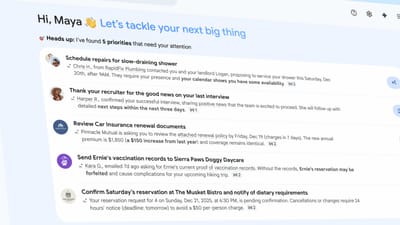
- A preview AI Inbox organizes unread mail into “Priorities” and “Catch me up” sections.
- The AI Inbox is initially available to a limited group of trusted testers.
- New Gemini features roll out to paying Gmail users today, expanding previously premium‑only tools.
- Google emphasizes AI’s role in making email handling faster and more intelligent.
AI Overviews Expand Into Gmail Search
Google’s latest Gmail enhancements bring the AI Overview experience, first introduced last year for summarizing email chains, into the realm of search. Users can now type a natural‑language query, and the Gemini engine scans their messages, generating a formatted answer that pulls relevant details directly from the inbox. For example, a search for a past plumbing quote would return a concise response that cites the original email, rather than a list of potential matches. While Google acknowledges that AI Overviews in search have sometimes been inaccurate, grounding the responses in a user’s own email may reduce errors.
AI‑Powered Proofreading for Paying Subscribers
Pro and Ultra Gmail subscribers will receive a new proofreading tool that appears as dotted underlines within the email composition window. The AI suggests nuanced edits to improve clarity and flow, going beyond basic spellchecking. Google says these suggestions are driven by its most powerful Gemini 3 models, promising more sophisticated language refinement than previous tools.
Introducing the AI‑Organized Inbox
Google is also previewing an AI‑driven version of its iconic inbox layout. Initially rolled out to a group of “trusted testers,” the AI Inbox analyzes unread messages and creates an interactive list with two main sections. The top “Priorities” area surfaces emails that Gemini deems important, while the “Catch me up” segment offers brief summaries of less critical messages. This design relies on Gemini’s ability to differentiate between high‑ and low‑importance content, aiming to help users focus on the most relevant communications first.
Rollout Strategy and Availability
The new Gemini experiences are being introduced to paying Gmail subscribers today, with several features that were previously limited to premium users now becoming more widely available. The AI Inbox will continue its testing phase before expanding to a broader audience, while the AI Overviews and proofreading tools are set to reach all eligible users as part of Google’s ongoing effort to embed AI deeper into everyday email workflows.
Implications for Email Productivity
By integrating AI into search, composition, and inbox organization, Google aims to reshape how users interact with email. The company believes these tools will streamline information retrieval, reduce drafting time, and prioritize critical messages, marking what it describes as another transformation in email driven by artificial intelligence.
Source: arstechnica.com