
Key Points
- Google Docs now offers Gemini‑driven Audio Summaries.
- Feature creates short, natural‑language audio recaps of documents.
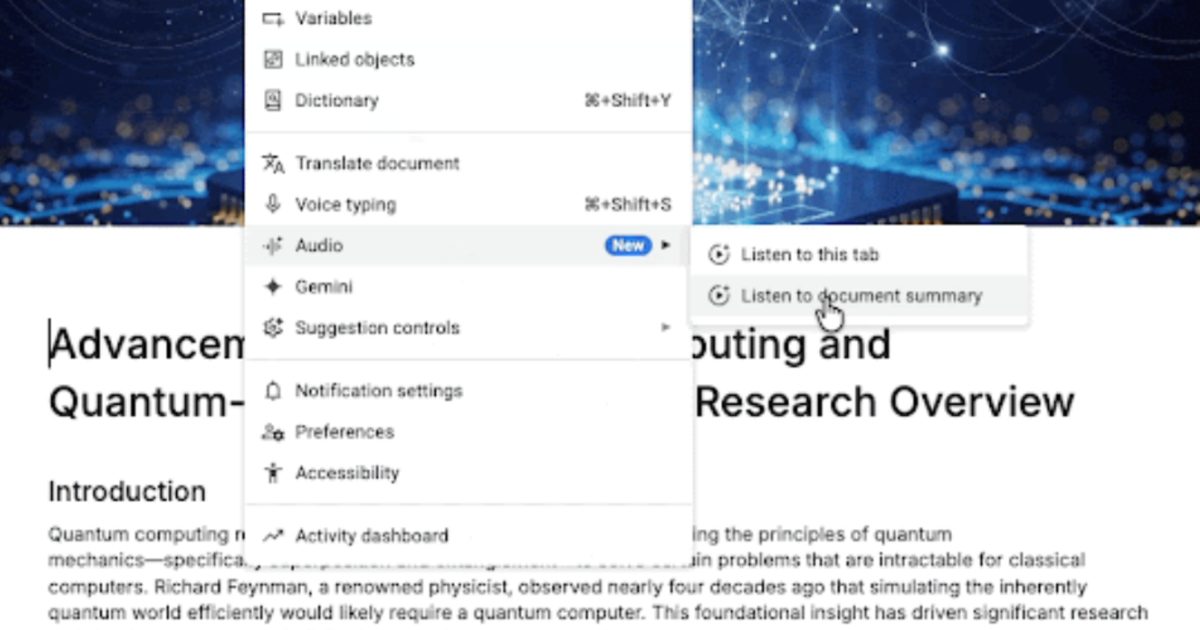
- Access via Tools > Audio > Listen to document summary on the web.
- Playback includes speed control, voice style selection, and standard controls.
- Currently limited to paid Workspace Business and Enterprise plans and select AI add‑ons.
- Designed to boost productivity for multitaskers and improve accessibility.
- Google warns summaries may omit important details.
- Rollout is gradual and not available to free users.
Google Introduces Gemini‑Powered Audio Summaries for Docs
Google has launched a new feature for its Docs platform that leverages the Gemini artificial‑intelligence model to generate audio summaries of documents. The tool, called Audio Summaries, creates a short, natural‑language recap of a file—typically just a few minutes long—so users can listen to the core ideas without reading the entire text.
To use the feature, users navigate to the web version of Google Docs and select Tools > Audio > Listen to document summary. Once activated, Gemini scans the document, produces a narrated summary, and offers standard playback controls such as play, pause, timeline scrubbing, and speed adjustment. Users can also choose between different voice styles, allowing a degree of personalization that mirrors the experience of a podcast.
Target Audience and Availability
The Audio Summaries capability is being rolled out gradually and is not available to free‑tier accounts. Access is currently limited to paid Google Workspace plans, including Business Standard and Business Plus, as well as Enterprise Standard and Enterprise Plus. In addition, the feature is offered through certain AI add‑ons, specifically Google AI Ultra and AI Pro. This tiered availability suggests Google is positioning the tool for professional and enterprise users who can benefit from multitasking and accessibility enhancements.
Potential Benefits
By converting lengthy documents—such as product manuals, meeting minutes, or quarterly reports—into brief audio formats, the feature aims to boost productivity for multitaskers. Users can listen while walking, exercising, or handling other tasks, making it easier to stay informed without being anchored to a screen. The natural‑sounding voices, described as similar to the Gemini AI assistant, provide an experience that feels conversational rather than robotic.
Cautions and Limitations
Google advises users to approach the summaries with care, noting that the condensed format may miss some important details present in the full document. As a result, while the tool can serve as a useful overview, it should not replace thorough reading when precision is required.
Overall Impact
The introduction of Gemini‑powered Audio Summaries reflects Google’s broader strategy to embed generative AI across its productivity suite. By offering an audio‑first option, the company addresses both productivity and accessibility needs, catering to users who prefer auditory consumption or who require assistive technology. The feature’s limited rollout to paid tiers underscores a focus on enterprise adoption while hinting at possible future expansion to a broader user base.
Source: digitaltrends.com